
Website Optimization Services That Turn Visits Into Leads

Someone visited your website this week. They landed on your homepage, scrolled for about twenty seconds, and left without filling out a form, clicking a phone number, or reading past the third paragraph. You might have paid for that visit through ad spend, or earned it through years of consistent content work. Either way, the visit produced nothing. Businesses that invest in website optimization services often find that the problem was never traffic. The gap between visits and leads almost always comes down to what the site does once someone arrives. What Your Traffic Numbers Are Not Telling You Traffic reports are easy to read in ways that feel encouraging. Sessions are up, impressions are growing, and pages per visit look steady. None of that tells you whether a single person who landed on your site left with any intention of calling you. The Difference Between a Visit and an Intent Signal A visit is a count. An intent signal is behavior. A visitor who spends time on a specific service page, scrolls past the halfway point on your about page, or returns within 48 hours is showing something a raw session number does not. Most analytics dashboards default to the count, and most teams stop there. Unbounce’s 2025 conversion benchmark report found a median landing page conversion rate of 6.6 percent across industries. Landing page benchmarks offer a useful frame of reference, even though service pages and homepages often convert differently depending on traffic source and page purpose. When your highest-traffic pages are consistently underperforming that range, the issue is almost always in how the page communicates value, not in the volume of people arriving. Where Visitors Drop Off and Why The pages that lose leads most often are the ones you assume are working: Homepage exits happen when the headline does not match what someone expected based on the link they clicked. Service pages lose visitors when the copy describes the process instead of the outcome. Contact forms get the least forgiveness, especially when the value exchange is unclear or the ask feels premature. Exit rate data on those three page types gives you a map of where visitor confidence breaks down. Once you know where they leave, you know where to start. What Website Optimization Services Actually Address The word optimization gets used loosely enough that it has started to lose meaning. Some agencies apply it to any round of site updates. For lead generation, optimization addresses two things. The first is how fast and stable a site performs in real conditions. The second is whether the copy and structure guide a visitor toward a decision. Speed, Structure, and the Five-Second Window Google’s Core Web Vitals measure loading performance, visual stability, and interactivity in real-world conditions. Google frames these signals as part of page experience and notes that they can affect performance in Search when competing pages offer similarly relevant content. Slow pages and unstable layouts create friction in those first few seconds, and friction is what makes visitors leave before they see your offer. Page structure amplifies or reduces that friction. Where your primary call to action appears, how your value statement reads above the fold, and whether your heading hierarchy signals clear navigation all shape what a visitor decides in those first seconds. Most business websites create friction before a visitor reaches your offer: The headline describes the company rather than the problem it solves Navigation presents six or more unlabeled options at once The hero image takes three or more seconds to load on mobile. No visible next step appears until the footer. Each of those points costs you part of the audience you already brought in. Messaging Gaps That Cost You the Form Fill Page speed gets the most attention in optimization conversations, but messaging gaps are often where qualified leads are lost. A site loading in under two seconds still converts nothing when the copy does not address what a prospect needs to hear before making a decision. The most common failure on services pages is language that describes the work rather than the result. “We offer strategic brand development and content marketing” tells a visitor what the agency does. “Your brand should be what a client says when someone asks who they trust,” tells a visitor what changes. The second version moves someone toward a decision. The first gives them no particular reason to stay. Form fill rates drop for a related reason. “Contact us,” says someone to start a conversation without explaining what they get from it. Naming the next step specifically, such as “Get a Website Review” or “Talk to Our Team About Your Site,” changes the perceived cost of clicking. Does Your Website Actually Qualify Your Visitors? A site optimized for lead generation does more than attract clicks. It screens for the right kind of prospect before anyone picks up the phone. The Pages That Create or Lose Lead Confidence Three pages make or break credibility faster than any other. Each one carries a specific job: The about page is where visitors decide whether they trust the people behind the site. The services page is where they decide whether you solve their specific problem. Portfolio work, case studies, or documented client outcomes answer the question running in the background throughout a visit: has this company done this for someone like me? Social proof placed only in the footer functions differently than proof placed where doubt typically enters a buyer’s mind. On a services page, that doubt tends to arrive about halfway down, after a visitor has understood the offer but has not yet decided to act. Placing a testimonial or outcome example at that point does more work than any closing statement. The CTA Architecture Most Sites Get Wrong Most sites offer one CTA repeated in the same form across every page. That approach treats every visitor as being at the same decision stage, and they are not. A first-time visitor who found you through a blog

How a Website Redesign Can Damage Your Organic Search Rankings

You launch a redesign to make your site feel fast and modern, only to watch your organic traffic begin a slow, silent slide. While the new aesthetic looks like progress to you, Google often interprets these changes as a ‘new’ site with no established history. Search engines reward stability and clear architecture; therefore, when a redesign disrupts these elements, Google may reset your hard-earned authority. Unfortunately, most teams don’t realize this shift has occurred until the ranking damage is already done. Why Do Visually Better Websites Lose Search Traffic? A redesign often starts with the idea of cleaning up. Teams remove old content, change the navigation, and simplify URLs. This breaks the historical signals that helped the site rank in the first place. The Clean Slate Fallacy Backlinks, internal links, and user behavior are tied to specific URLs. When you delete or rename those pages without redirects, Google loses the context. The new site looks empty or unrelated. URLs are not cosmetic. They store accumulated trust. A new URL with no redirect tells Google the old content is gone. Authority built over the years is erased in seconds. The Dip vs. the Tank After a redesign, expect a temporary traffic dip. This is part of reindexing. A dip is short-term. Expect a 5 to 10 percent drop over two to four weeks. A tank is long-term. A 20 percent or greater drop lasting more than 30 days means structural failure. Most teams misread the signs. Waiting for traffic to return without action leads to deeper losses. What Happens When You Change URLs Without a Map? How Link Equity Works Every link to your site passes authority. That value is tied to a specific URL. A 301 redirect transfers most of that value to a new location. It must be one-to-one. Redirecting to unrelated pages weakens the link. Chains of multiple redirects lose more equity at each step. Broken redirects result in a complete loss of value. The correct approach is a clean 301 from the old page to the closest matching new page. Redirecting to the homepage is a known failure pattern. Google reads it as irrelevant. The Soft 404 Trap Redirecting deleted pages to the homepage is treated as a soft 404. That means the page is not seen as real content. It passes no value. It may confuse users and increase bounce rates. Do this instead: Redirect to a relevant replacement if one exists. Let deleted pages return a 404 or 410 if no replacement exists. For more on proper redirect strategy, see Google’s redirect guidelines. Can JavaScript Break Your SEO? Client-Side Rendering and Indexing Delays JavaScript frameworks often use client-side rendering. This creates a two-phase indexing process. First, Google crawls the raw HTML. If content is not present, the page appears empty. Later, Google renders the page and indexes the visible content. That delay is a risk. If Google cannot see the content immediately, the page may not rank. This is worse for pages that rely on crawl budget, such as large sites or e-commerce platforms. Use Server-Side Rendering or Static Generation Modern frameworks like Next.js offer server-side rendering (SSR) or static site generation (SSG). These methods generate HTML before sending it to the browser. SSR ensures content is available in the raw HTML. SSG prebuilds pages, making them fast and indexable. Incorrect use of SSR features negates the benefits. Developers often use use client for critical content. That prevents server-side rendering. Pages appear blank to bots and fail to rank. For technical best practices, see Google’s JavaScript SEO basics. Is That Low-Traffic Page Hurting You? The Risk of Over-Pruning During redesigns, teams often delete pages that show low or no traffic. This can be a mistake. Some of those pages: Contain valuable backlinks. Link to high-converting service pages. Build topical authority. Removing them weakens the structure of your site. Use the Keep, Kill, Combine Method Before deleting content, evaluate each page by these criteria: Keep it if the page has backlinks or supports the internal SEO flow. Combine if there are several pages on similar topics. Kill only if the page has no authority, traffic, or relevance. Traffic is not the only metric. Authority flows through structure. Deleting a zero-traffic page may reduce visibility for five others. How Does Navigation Impact Rankings? Click Depth Matters Google prioritizes content that is closer to the homepage. When a redesign buries pages under complex menus or extra layers, those pages lose value. Pages more than three clicks from the homepage are crawled less. Link equity decays with each hop. Visibility decreases for deeper pages. Orphaned Pages Get Ignored Orphan pages are those with no internal links pointing to them. They are invisible to crawlers unless submitted directly. Causes include: Removing sidebars or footer links. Changing navigation without updating internal links. Moving blogs or resources without linking them from the new layouts. You can find orphaned pages using crawl tools like Screaming Frog or Google Search Console. What Technical Mistakes Kill Rankings After Launch? X-Robots-Tag and Noindex Mistakes Developers often block indexing in staging environments using noindex or X-Robots-Tag. If those settings are not removed, the live site will not be indexed. X-Robots-Tag In server headers, it is not visible in HTML. Sites may appear functional, but are invisible to search engines. This causes total de-indexing over several days. Broken Canonicals Canonical tags point to the preferred version of a page. If these are left pointing to staging or old URLs, Google ignores the live page. Check for hardcoded staging URLs. Validate all canonical tags before and after launch. For troubleshooting, refer to Google’s Search Central documentation. Does Mobile Optimization Cost You Rankings? Hidden Content Reduces Relevance Mobile designs often collapse text into tabs, accordions, or hide it entirely. Google only indexes what it sees in the Document Object Model (DOM). If content is hidden or removed, it is ignored. Keep important text visible on mobile. Avoid hiding full paragraphs. Ensure DOM parity between desktop and mobile views. Core

Conversion Optimization: Where Leads Become Customers

You have done everything right. The prospect found you through your awareness efforts. They entered consideration and received months of valuable nurturing content. Now they are ready to decide, and suddenly, nothing happens. Leads becoming customers through optimization of your conversion process requires removing the friction that keeps them stuck. The final stage of the customer journey, where deals either close or die, is not usually about competitors. It is about the status quo. The current situation, however painful, feels safer than change. This is where all your previous work either pays off or gets wasted. The psychology here differs from earlier stages. During awareness and consideration, your job was to build interest and trust. Now your job is to overcome the natural human resistance to change. What Happens at the Moment of Decision The decision to buy is rarely rational. People like to believe they weigh pros and cons, evaluate alternatives systematically, and choose the objectively best option. Research from organizations like Gartner consistently shows Gartner otherwise. Emotions drive decisions, and logic justifies them afterward. At the moment of decision, your prospect is feeling something. These feelings determine what happens next: Confidence that you are the right choice Anxiety about making a mistake Excitement about the results they expect Fear about the disruption involved Understanding the emotional state of your prospects during the decision moment helps you address their actual concerns rather than the concerns you assume they have. Risk as the Real Objection When a prospect hesitates, the stated reason is rarely the real reason. They say they need to think about it, check with their team, or wait until next quarter. What they often mean is that the perceived risk of moving forward outweighs the perceived risk of staying still. Your job is to shift that equation. Sometimes this means reducing the perceived risk of choosing you. Sometimes this means increasing the perceived risk of not choosing anyone. The approach depends on what is actually driving the hesitation. Risk takes many forms: Financial risk if the investment does not pay off Career risk if the decision makes them look bad Operational risk if implementation causes disruption Each type of risk requires a different response. The Buyer’s Internal Battle Most B2B purchases involve multiple stakeholders. Even when your primary contact is enthusiastic, they may face skepticism or resistance from others in their organization. According to research on B2B buying behavior, purchases now average eight to ten decision makers Gartner, each with different priorities and concerns. The CFO questions the ROI. The operations team worries about implementation disruption. The CEO wants to know why now instead of next year. Conversion often depends on equipping your champion to win these internal battles. Give them the data, stories, and arguments they need to sell internally. Make it easy for them to explain why this investment makes sense, why you are the right partner, and why waiting costs more than acting. Create stakeholder-specific content that addresses the unique concerns of different roles: An executive summary for the CEO An ROI analysis for the CFO An implementation timeline for operations Each piece equips your champion to answer questions they will face. Does Your Proposal Help or Hurt The proposal is often the last piece of content a prospect sees before making a decision. It should crystallize everything they have learned and felt throughout the consideration process. Too often, proposals do the opposite. They introduce confusion, create new objections, and undermine the relationship that was built. A proposal that works is not a document that describes your services. It is a document that describes their future. It connects what you do to what they need in language that resonates with their goals and concerns. Review your current proposal template critically. Does it focus on your capabilities or their outcomes? Does it address their specific situation or describe generic services? The difference matters enormously. Structure That Guides Decision The fewer steps between decision and action, the less opportunity for second thoughts to creep in. Audit your contracting process from the client’s perspective. Consider the client’s burden: how many pages must they read? What number of forms do they need to complete? How many days does the overall process take? Eliminate every unnecessary step to smooth the transition. Each section should answer the question the reader has at that moment: What do you know about my situation? What will you do for me? What could go wrong? How much will it cost? What do I do next? Address these questions in order, and the proposal guides the prospect toward a decision. Keep proposals as short as possible while answering all necessary questions. Length does not demonstrate thoroughness. It demonstrates an inability to communicate efficiently. Pricing Presentation Psychology How you present pricing affects how it is perceived. A single number with no context feels arbitrary. The same number presented after a detailed value explanation feels justified. The same number positioned between two other options feels like a reasonable middle ground. Consider what comparison you want the prospect to make: Comparing your price to the cost of inaction Comparing it to the value of the expected results Comparing it to the price of inferior alternatives The comparison you set up frames how the number lands. Avoid surprises in pricing. If your proposal contains numbers significantly different from what the prospect expected, they will focus on that surprise rather than your value proposition. Discuss pricing directionally before the proposal arrives. What Creates Urgency Without Pressure Urgency accelerates decisions. Without urgency, prospects delay indefinitely, waiting for a perfect moment that never arrives. But manufactured urgency, the kind that relies on arbitrary deadlines and false scarcity, damages trust and often backfires. Real urgency comes from real consequences: The cost of waiting another quarter The opportunity that will pass if they do not act The competitive disadvantage that grows each month These consequences exist whether you point them out or not. Your job is to make them visible. Help prospects calculate

Why Website Redesigns Fall Flat and What Actually Fixes the Problem

There’s a familiar sting for marketing teams. A new website launches—carefully designed, full of the latest features—yet delivers lackluster results. Modern aesthetics and interactive tools are not enough. Many organizations find the real reason website redesigns fall flat in 2025 goes deeper than looks or technology. What appears to be a design problem often hides strategic gaps and missed opportunities to connect with real users. Chasing Trends Instead of Purpose Every year, new design trends and digital flourishes appear online. Teams feel pressure to adopt these styles—animated transitions, video backgrounds, bold color overlays. The hope is to seem modern and relevant. These design choices can elevate visual appeal, but they may distract from a site’s core goals. For example, a professional services firm might use playful colors to look innovative. This shift can alienate long-time clients who value familiarity and stability. A modern-looking interface doesn’t automatically create a better experience for the audience a business actually serves. Instead of focusing only on visual upgrades, organizations benefit by asking how each design element supports the brand’s promise and the needs of users. Strong online presences are built by aligning aesthetics with clear purpose. Losing Touch with the Real Audience In 2025, data about user behavior is more abundant than ever. Still, meaningful insight often gets lost in translation when teams focus on assumptions about their audience rather than observed behaviors. Redesigns that chase the preferences of hypothetical “ideal” users risk neglecting the routines of current, loyal customers. Imagine a consulting company that revamps its entire site for mobile efficiency, while most clients prefer accessing detailed resources on desktop. Overemphasis on innovation sometimes obscures the practical features that returning users value. Success comes from an ongoing commitment to understanding real users, gathering regular feedback, and responding to actual behaviors—not just statistical trends.Bullet points and heatmaps, paired with honest conversations, often reveal blind spots that site analytics alone can’t capture. Overlooking Fundamental Business Issues Website redesigns typically begin with calls for better aesthetics, faster loading times, or improved SEO rankings. Yet these are often symptoms of more significant, unresolved business challenges. Cosmetic updates alone do not solve deeper problems like unclear service offerings, convoluted product categories, or a lack of trust signals. For instance, a retailer may present a bold new look, but if checkout remains confusing or support is buried, shoppers will leave frustrated. Businesses sometimes invest in visual refreshes, hoping design will compensate for operational shortcomings. It rarely works. Lasting improvements start by identifying the underlying barriers to growth—be it messaging, navigation, or product clarity. Once addressed, design and technology have the foundation they need to make a difference. The Pitfall of “Launch and Leave” Redesign projects often demand months of focused energy, but once a new site goes live, attention tends to shift away quickly. Treating a website launch as a final destination rather than a new starting point can limit long-term success. The most successful organizations treat their websites as evolving platforms, using data and user feedback to drive continuous improvement. Routine content updates, regular usability tests, and small iterative changes keep digital experiences aligned with shifting user expectations. Letting a site stagnate, even if it launched beautifully, invites competitors to outpace you as technology and preferences evolve. Shifting from project-based thinking to a mindset of ongoing growth keeps digital properties relevant and high-performing. Stakeholder Conflicts and Decision Paralysis When every department pushes for visibility, the risk of losing focus rises. Multiple teams lobbying for homepage real estate often results in cluttered layouts and muddled messaging. Features and banners multiply as various voices press their priorities, diluting the clarity of the value proposition. In practice, this might look like a homepage overloaded with pop-ups, promotions, and competing calls to action, leaving visitors unsure where to focus. Without a strong decision-maker to filter input and maintain direction, the user experience suffers. Empowered leadership and a commitment to audience needs over internal politics keep redesign projects on course and user-friendly. Technology Chosen for the Wrong Reasons The landscape of web development in 2025 is saturated with new tools and frameworks—headless CMS platforms, AI-powered plugins, and complex integrations all vying for attention. While these technologies promise flexibility and innovation, they can create headaches if selected without a clear use case. Organizations sometimes add the latest features in hopes of boosting credibility, but end up with slower load times or complicated workflows. For example, an advanced personalization tool may sound attractive, but if it disrupts navigation or fails to deliver relevant content, it can frustrate users and erode trust. New technologies should support clear objectives—streamlining user journeys, improving access to information, or enabling better service—not simply checking boxes for innovation. Measuring Progress That Matters Metrics like page views and session duration are easily tracked, but they don’t always reveal whether a redesign achieved meaningful results. Organizations often celebrate spikes in traffic or lower bounce rates without tying those numbers to business outcomes such as lead quality, customer retention, or sales. Effective measurement strategies focus on actionable KPIs and user behaviors that support broader organizational goals. For example, tracking form completion rates, repeat visits, or average order values yields insights that directly connect web performance to business impact. By prioritizing substance over appearance in measurement, teams are better equipped to adapt their strategies and deliver real value. Building Websites That Stand the Test of Time Digital trends may come and go, but the most resilient websites are built with substance and adaptability. Teams that dedicate time to understanding their audiences, address core business issues, and treat their sites as evolving platforms consistently see stronger results. Thoughtful leadership, strategic use of technology, and focus on authentic metrics set high-performing websites apart. Instead of chasing fleeting trends, organizations should ask tough questions and stay connected with users. This approach leads to lasting digital success. In 2025, the real advantage isn’t having the flashiest site. Success comes from a user experience that is purposeful, consistent, and matched to real-world needs.

How a Fresh Website Design Boosts Lead Generation

A fresh website design boosts lead generation by creating an inviting, user-friendly experience that encourages visitors to engage and take action. In today’s digital landscape, first impressions matter, and your website often sets the tone for customer relationships. When your site is modern, optimized, and visually appealing, it acts as a magnet for leads, helping your business grow faster and smarter. Why Your Website is Key to Lead Generation Your website serves as your digital storefront, often shaping the first impression potential customers have of your brand. If visitors find it outdated or difficult to use, they’re likely to leave and explore competitors. Essential Features of a High-Converting Website: Responsive Design: Ensure your site looks and works well on all devices. Clear Calls-to-Action (CTAs): Encourage visitors to take specific steps like subscribing or contacting your team. Fast Load Speeds: Keep visitors engaged by reducing wait times. Seamless Navigation: Make it easy for users to find what they need. A website designed with these elements becomes a powerful tool for driving lead generation, ensuring visitors stay and engage rather than bounce. User Experience: The Foundation of Lead Generation User experience (UX) is the secret sauce behind high-performing websites. When visitors enjoy navigating your site, they’re more likely to explore further and engage. How UX Drives Engagement: Simplified Layouts: Organize content to guide visitors toward your CTAs. Faster Load Times: A one-second delay can reduce conversions by up to 7%. Mobile Accessibility: With over half of all web traffic coming from mobile devices, a responsive site is essential. Accessibility Features: Tools like alt text for images and keyboard navigation expand usability. By prioritizing UX in your redesign, you create an inviting digital environment that naturally converts visitors into leads. Mobile Optimization: A Non-Negotiable for Lead Generation More than 50% of internet users browse on mobile devices. If your website isn’t optimized for smaller screens, you risk alienating a huge audience. Benefits of a Mobile-Friendly Website: Higher Engagement: Mobile users expect intuitive design and quick navigation. Improved Load Speed: Optimized mobile pages load faster, reducing bounce rates. Better SEO Rankings: Search engines reward mobile-friendly sites with higher visibility. Example: Consider a local business with a mobile-optimized website. They experience a 30% increase in contact form submissions after redesigning for mobile compatibility. This demonstrates the significant impact of mobile-first design on lead generation. The Power of Visual Design in Building Trust Visitors form opinions about your website almost instantly. A polished, modern design helps establish trust and credibility, while a cluttered, outdated look can drive users away. Tips for Visual Design Success: Professional Images: High-resolution visuals convey quality and attention to detail. Consistent Branding: Use uniform colors, fonts, and imagery to reinforce your brand identity. Whitespace: Allow breathing room between elements to improve focus and readability. Interactive Features: Tools like sliders and animations add a dynamic element to the user experience. By making thoughtful visual updates, your website becomes a compelling representation of your brand, fostering trust that leads to conversions. The Art of Strategic Call-to-Actions (CTAs) A website without CTAs is like a roadmap with no destination. Effective CTAs guide users toward meaningful actions, turning passive visitors into active leads. How to Craft Perfect CTAs: Use Clear Language: Action words like “Subscribe,” “Download,” or “Get Started” motivate users. Strategic Placement: Position CTAs at key points like the header, middle of the page, or after engaging content. Test Multiple Variations: Experiment with wording, colors, and placement to find what resonates. Make Them Stand Out: Use bold designs or contrasting colors to grab attention. Example: A service-based business redesigned its website to include CTAs like “Request a Free Consultation” on every service page. This resulted in a 40% increase in inquiries. SEO and Lead Generation: A Perfect Partnership A fresh website design offers an excellent opportunity to enhance your SEO strategy. Better SEO means higher search engine rankings, which leads to increased traffic and more potential leads. SEO Improvements During a Redesign: Optimized Images: Compress images to maintain quality while improving load times. Meta Descriptions: Include concise, keyword-rich descriptions for better click-through rates. Structured Content: Use headings and subheadings to make content scannable for users and search engines. Internal Links: Guide users to related pages to keep them on your site longer. Real-Life Results: Companies that invest in SEO as part of their redesign often see a 30% increase in organic traffic within six months. Content Matters: How to Engage Visitors Your website’s content plays a critical role in keeping visitors interested and turning them into leads. Without valuable, targeted content, even the best design will fall flat. Content That Converts: Case Studies: Showcase real-world success stories to build credibility. Blog Posts: Provide educational and engaging content to establish authority. Landing Pages: Create focused pages tailored to specific campaigns or audiences. FAQs: Address common questions to make visitors feel understood. Fresh, relevant content aligned with your audience’s needs ensures your site remains both informative and engaging. Measuring the Impact of Your Website Redesign Once your redesign goes live, monitoring performance is essential to assess success and identify areas for improvement. Metrics to Track: Bounce Rate: Indicates how well your site retains visitors. Conversion Rate: Measures how many users take desired actions, like filling out a form. Session Duration: Longer visits suggest higher engagement. Traffic Sources: Pinpoint where your leads are coming from, such as search engines or social media. Using tools like Google Analytics helps you refine your strategies for even better results over time. Conclusion A fresh website design boosts lead generation by delivering a seamless user experience, improving mobile compatibility, and optimizing for SEO. With modern visuals, strategic CTAs, and engaging content, your site can become a powerful driver of business growth. Investing in a website redesign isn’t just about keeping up appearances—it’s about creating a better platform for your business to thrive. Take the first step today and unlock your website’s full potential as a lead-generation powerhouse.

The Ultimate Guide to Effective Web Development Conversion

Effective web development is about more than just creating a visually appealing site—it’s about building a platform that performs seamlessly and turns visitors into customers. The Ultimate Guide to Effective Web Development Conversion details strategies to boost website performance and drive user conversions. Whether you’re launching a new project or refining an existing one, understanding how design, functionality, and user experience intersect is crucial for maximizing results. By aligning these elements with your business goals, you can create a website that not only attracts users but also converts them into valuable leads or sales. The Role of Web Development in Driving Conversions Web development plays a critical role in shaping how users interact with your site and whether they take action. It’s not just about getting the website to work; it’s about crafting an experience that leads visitors toward conversion. Several key factors drive conversion, including speed, functionality, and user engagement. To start, page load speed directly impacts user retention. Studies show that a slow-loading page can cause users to abandon the site, leading to a loss in potential conversions. Web development teams can optimize page speed by compressing images, reducing server response time, and minimizing code bloat. In addition to speed, mobile responsiveness is vital for increasing conversion rates. More than half of today’s web traffic comes from mobile devices, so if your site isn’t optimized for mobile use, you risk losing a large chunk of potential customers. A responsive design adapts to different screen sizes and ensures that the website maintains a consistent experience across all devices. Fast-loading pages keep users engaged and reduce bounce rates. Mobile-responsive designs ensure a seamless experience for all visitors. User-friendly layouts guide visitors toward desired actions easily. Clear navigation reduces friction and improves the overall user experience. Compelling calls-to-action (CTAs) prompt users to take immediate steps, increasing conversion opportunities. By focusing on these aspects, web developers create an environment where visitors can effortlessly engage with content and follow conversion paths. Understanding User Experience Design in Web Development User experience (UX) design is the cornerstone of any successful web development strategy. A well-designed website makes it easy for users to navigate and find the information they need without hassle. Good UX reduces friction points and encourages users to stay on the site longer, which increases the likelihood of conversion. Clear navigation and strategically placed CTAs are vital components of UX design. They guide users through the site without causing confusion or frustration. For example, a confusing layout or hard-to-find buttons may frustrate users, driving them away instead of leading them toward conversion. Moreover, consistent design elements—such as color schemes, fonts, and button styles—foster a cohesive experience. Consistency reassures users that they’re in the right place and makes the entire journey feel seamless. Consistent design elements make the site feel professional and trustworthy. Intuitive navigation improves the ease of use and keeps users engaged. Effective CTAs drive users to perform specific actions, such as making a purchase or signing up for a service. Minimalist design reduces distractions and keeps users focused on the core message. Streamlined content layout ensures users can quickly find what they’re looking for. This attention to user behavior helps businesses create a smoother experience, ensuring that users are more likely to convert. Conversion Optimization Through A/B Testing and Analytics After the website goes live, the work doesn’t stop. Regular testing and optimization are crucial for increasing conversion rates over time. One effective technique for ongoing optimization is A/B testing. In A/B testing, developers test two different versions of a webpage or element (such as a button) to see which performs better. For example, changing the color of a CTA button or moving it to a more prominent location can improve user interaction. Developers can use tools like Google Optimize to run these tests and measure the impact of each change. In addition to A/B testing, it’s essential to monitor analytics. Analytics platforms, such as Google Analytics, track user behavior, including how long they stay on the site and which pages they visit. These insights help identify potential bottlenecks in the user journey. A/B testing allows developers to fine-tune elements for maximum impact. Analytics tools provide data-driven insights for informed decision-making. Conversion funnels highlight where users drop off, helping identify problem areas. Page views and session duration reveal which content resonates most with visitors. User behavior tracking offers deeper insights into how visitors interact with the site. Through A/B testing and analytics, web developers can continuously improve site performance and boost conversion rates. The Importance of Content Management Systems in Web Development A flexible content management system (CMS) is essential for maintaining an up-to-date website. A good CMS makes it easy to update content, ensuring the site remains fresh and relevant to users. This ease of management allows businesses to publish new material regularly, keeping the audience engaged and improving SEO performance. A well-built CMS also integrates with third-party tools, enhancing the site’s functionality. For example, marketing automation platforms and email marketing systems can be seamlessly added to improve user engagement and personalization. User-friendly CMS allows for easy updates without the need for technical expertise. Third-party integrations extend the functionality of the website. Regular content updates keep the site fresh and improve search engine rankings. Automation tools streamline marketing efforts and provide more personalized user experiences. CMS scalability ensures the platform can grow with the business. Web developers should choose a CMS that meets the business’s needs and allows for easy modifications without slowing down site performance. Building Trust with Security and Performance Optimization Trust is a crucial element of any high-converting website. Visitors need to feel secure when interacting with your site, especially if they are providing personal information or making purchases. Web developers can enhance trust by implementing solid security measures, such as SSL certificates and encrypted payment gateways. Beyond security, performance optimization also plays a significant role in building trust. Websites that load quickly and perform well across all devices create a positive impression and encourage users

Your DIY Website Looks like a Middle School Science Project

Creating a website yourself can be a thrilling endeavor. However, many pitfalls can make your DIY website look like a middle school science project, but professional design services can elevate its appeal. A website is often the first interaction potential clients have with your brand, making it crucial to create a positive and lasting impression. From inconsistent branding to poor user experience, DIY websites frequently fall short in several key areas. This article explores the common mistakes of DIY web design and offers practical solutions to transform your site into a polished, professional platform that effectively represents your business and engages your audience. The Pitfalls of DIY Website Design When it comes to DIY website design, enthusiasm is often high, but the results can be underwhelming. The issue lies not in the effort but in the execution. Many people underestimate the complexity involved in creating a website that not only looks good but also functions smoothly. Common pitfalls include: Clashing color schemes Confusing navigation Poorly formatted content These elements can make your site appear amateurish and deter potential clients. Therefore, addressing these issues is essential for a professional appearance. Lack of Professional Aesthetics One of the most noticeable aspects of a DIY website that falls short is its aesthetic appeal. A professional-looking website needs to have a cohesive design that aligns with your brand’s identity. DIY websites often miss the mark with: Inconsistent fonts Uncoordinated color palettes Mismatched visual elements Thus, it’s essential to have a well-thought-out design that conveys professionalism and reliability to visitors. Attention to detail in visual consistency can significantly elevate the overall look of your website. Inconsistent Branding Branding is crucial for any business, and your website is a key part of your brand’s identity. DIY websites frequently suffer from inconsistent branding, which can confuse visitors and weaken your brand’s impact. Elements such as logos, color schemes, and typography need to be uniform across all pages. This consistency helps in establishing trust and recognition among your audience. To achieve this, create a branding guide that outlines these elements and ensures they are applied consistently. Poor User Experience (UX) A significant factor that differentiates a professional website from an amateur one is the user experience. DIY websites often fail to provide a seamless UX due to a lack of expertise in layout design, navigation, and interactive elements. A poorly structured website can frustrate users, leading them to abandon your site. Therefore, prioritizing a user-friendly design is essential for keeping visitors engaged and encouraging them to explore your offerings. Simple, intuitive navigation and a clear layout can drastically improve the user experience. Ineffective Mobile Optimization With the growing use of smartphones, having a mobile-optimized website is no longer optional. Unfortunately, many DIY websites are not designed with mobile users in mind, resulting in a subpar experience on smaller screens. Mobile optimization involves more than just scaling down content; it requires thoughtful reorganization of elements to ensure they are easily accessible and navigable on mobile devices. Responsive design principles should guide this process, making sure that content remains readable and interactive on all screen sizes. SEO Shortcomings Search Engine Optimization (SEO) is a critical aspect of online visibility. DIY websites often lack the necessary SEO elements that help in ranking higher on search engine results. These include: Meta tags Alt text for images Keyword-rich content Without proper SEO, your website may struggle to attract organic traffic, making it harder for potential clients to find you. Hence, incorporating SEO best practices is vital for online success. Regularly updating your content and utilizing tools like Google Analytics can help maintain and improve your SEO efforts. Technical Glitches and Load Times Technical issues such as slow load times, broken links, and unresponsive pages can severely impact the user experience. DIY websites are prone to these problems due to the use of inappropriate tools or lack of technical knowledge. Ensuring that your website is technically sound is crucial for maintaining user interest and improving your site’s performance. Regular checks can help mitigate these issues. Additionally, investing in reliable hosting services and optimizing images can significantly reduce load times. Lack of Professional Content Content is king, but only if it is well-crafted and relevant. DIY websites often feature content that is either too sparse or overly verbose, failing to strike a balance. Professional content writing ensures that the information presented is: Engaging Informative Aligned with your brand’s voice High-quality content is vital for holding the reader’s attention and conveying your message effectively. Consider incorporating multimedia elements like videos and infographics to make your content more engaging and easier to digest. Missed Marketing Opportunities A professionally designed website is not just about aesthetics; it is also a powerful marketing tool. DIY websites frequently miss out on integrating marketing strategies such as: Lead capture forms Social media links Call-to-action buttons These elements are essential for converting visitors into customers and should be strategically placed to maximize their impact. Effective use of these tools can lead to higher engagement rates and more conversions. Don’t forget to integrate analytics tools to track the performance of these elements and make data-driven improvements. How to Elevate Your Website Design Transforming your DIY website into a professional platform involves a combination of design refinement, technical optimization, and strategic content creation. Here are some steps you can take: Invest in Professional Design Services: Hiring a professional web designer can make a world of difference. They bring expertise and experience that can help you achieve a polished look that aligns with your brand. Ensure Consistent Branding: Work on creating a consistent brand identity across your website. This includes using uniform colors, fonts, and logos to create a cohesive look. Optimize for User Experience: Focus on creating an intuitive navigation structure. Make sure that visitors can easily find the information they need without getting frustrated. Mobile Optimization: Ensure that your website is fully optimized for mobile devices. Test your site on various screen sizes to confirm that it is responsive and user-friendly. Implement

Tips Tricks and Trends in Website Development

In the fast-paced digital era, an effective online presence is crucial for businesses looking to thrive. Website development plays a pivotal role in shaping this online identity and because of this, the task of tackling a website can feel daunting. Understanding and implementing the various tips, tricks, and trends in website development can significantly impact your success. Responsive Design: A Non-Negotiable Imperative Embracing the mobile era is no longer a choice but a necessity. A responsive design ensures your website adapts seamlessly to various devices, providing an optimal user experience. Google’s mobile-first indexing makes this a key factor for SEO success. In the era of smartphones, users expect a seamless experience. Responsive design not only caters to diverse devices but also boosts your site’s SEO, aligning with Google’s mobile-centric approach. User-Centric Navigation: The Path to Engagement Users should effortlessly navigate your website. Intuitive menus, clear calls-to-action, and a logical flow enhance user experience. Implementing user feedback and conducting usability tests can help you refine navigation for maximum engagement. A well-designed navigation system guides users intuitively, reducing bounce rates. Regularly test and refine navigation based on user feedback to ensure a smooth and engaging journey through your website. Optimizing for Speed: The Need for Velocity In the digital realm, speed is king. Slow-loading websites frustrate users and can negatively impact search rankings. Compressing images, leveraging browser caching, and minimizing HTTP requests are among the techniques to boost your website’s speed. Speed is not just a user preference but a ranking factor for search engines. Optimize your site’s speed by compressing images and utilizing caching mechanisms, ensuring a swift and satisfying user experience. Security: Guarding the Digital Fort With cyber threats on the rise, prioritizing website security is non-negotiable. Incorporate SSL certificates, regularly update software, and conduct security audits. A secure website not only protects your users but also contributes positively to your SEO. Incorporating the Latest Design Trends A visually appealing website is more likely to captivate users. Stay updated with design trends such as dark mode, micro-interactions, and 3D elements. Collaborating with a reputable branding agency can infuse creativity and align your website with contemporary aesthetics. Trends in design evolve rapidly. Embrace modern aesthetics like dark mode and interactive elements to keep your website visually captivating and in line with the latest design sensibilities. Content is Still King: SEO-Optimized Blogging A blog isn’t just a platform for expressing ideas; it’s a potent SEO tool. Regularly publishing relevant and optimized content can enhance your website’s visibility. Collaborating with a marketing agency can help you create a content strategy that resonates with your audience. The significance of a blog extends beyond expression—it’s a strategic SEO tool. Collaborate with a marketing agency to craft a content strategy that not only engages but also boosts your website’s visibility in search engine results. Cross-Channel Marketing Integration Today’s digital landscape demands a holistic approach. Integrate your website seamlessly with various marketing channels. Cross-channel marketing, when executed strategically, enhances brand visibility and facilitates a cohesive user experience. Siloed marketing efforts are outdated. Seamlessly integrate your website with diverse marketing channels for a cohesive brand presence, ensuring your audience receives a unified and impactful message across different platforms. The Power of Apps: Extending Reach Mobile apps are becoming increasingly popular for businesses. Developing a companion app can provide additional value to users and strengthen brand loyalty. Work with an app development team to create a seamless connection between your website and app. A dedicated app enhances user engagement and brand loyalty. Collaborate with an app development team to create a symbiotic relationship between your website and app, offering users a seamless experience across both platforms. Direct Mail Marketing in the Digital Age While digital marketing is dominant, don’t overlook the power of direct mail, especially in B2B scenarios. A well-crafted direct mail campaign can complement your online efforts and foster meaningful connections. In the digital age, direct mail stands out. Combine the personal touch of direct mail with your online efforts for a comprehensive marketing strategy, especially effective in B2B scenarios where personal connections matter. Localizing Marketing Efforts: Anne Arundel County Focus If your business operates in Anne Arundel County, tailor your website development and marketing strategies to the local audience. Collaborating with an advertising agency familiar with the region can give you a competitive edge. Localizing efforts for Anne Arundel County strengthens your connection with the community. Collaborate with a local advertising agency to infuse regional insights into your website development and marketing, gaining a competitive advantage in the local market. AI Integration: Smart Solutions for Enhanced User Experience The future of website development lies in artificial intelligence (AI). Implementing AI-driven solutions, such as chatbots and personalized recommendations, can elevate user experience and streamline interactions on your website. AI isn’t just a buzzword—it’s a game-changer in web development. Explore the potential of chatbots for instant customer support and personalized recommendations based on user behavior, providing a more tailored and efficient experience. Video Content: Captivating Audiences Beyond Text Video content continues to dominate online engagement. Incorporating engaging videos on your website can capture attention and convey information more dynamically. Collaborate with a marketing agency to create compelling video content that aligns with your brand. In the age of short attention spans, videos speak louder than words. Leverage the power of video content to convey your message effectively. Partnering with a marketing agency ensures your videos align with your brand identity and resonate with your target audience. Final Thoughts Mastering the art of website development involves a multifaceted approach that encompasses responsive design, user-centric navigation, speed optimization, robust security measures, and staying abreast of design trends. Integrating cross-channel marketing, developing companion apps, and leveraging the timeless power of direct mail marketing further enhance your digital presence. Tailoring efforts to the local landscape, such as Anne Arundel County, ensures a personalized connection with the community. As we look to the future, the integration of AI and the captivating allure of video content are set to redefine user experiences. By

The Importance of Keeping Your Website Fresh and Relevant

It’s easy to forget that the world of digital marketing is only as old as the early 90s. Those thirty-odd years have proven that within one year, the industry as a whole can change drastically by introducing new tools, technology, trends, and demands to keep your consumers engaged with your services. A website is a dynamic showcase of a company’s brand, values, and commitment to staying ahead of the curve. Underestimating the importance of a fresh and relevant website can diminish customer engagement and harm your brand’s image. On the flip side, a website that is regularly updated with new content can greatly enhance user engagement and raise your company’s profile in the competitive market. It is vital for businesses to understand the need to keep their website up-to-date, user-friendly, and aligned with the latest industry trends as a means to strengthen their digital presence and drive growth. The Significance of Fresh Content Boosting Search Engine Optimization (SEO) Search engines like Google favor websites that are updated regularly with new and relevant content. By consistently adding fresh articles, blog posts, and multimedia, you tell search engines that your site is active. This can lead to better rankings in search results, making your website more visible and likely to attract more visitors. Staying current with search trends and user queries also helps improve your SEO efforts. Establishing Thought Leadership Sharing the latest insights, analyses, and industry trends through updated content helps position your brand as a leader in your field. Demonstrating your expertise builds trust with your audience, which is crucial for turning visitors into loyal customers. Thought leadership also influences your peers and competitors, putting your brand at the forefront of the industry. By consistently providing valuable and authoritative content, you not only inform your audience but also encourage them to see your brand as a go-to resource within your industry. Engaging and Retaining Users To keep your audience interested and coming back, it’s important to provide new and captivating content regularly. This not only increases the chances of conversions but also strengthens customer loyalty as they begin to rely on your site as a trusted source. Engaging content also prompts users to share your site, helping to expand your reach and influence. Furthermore, a steady stream of fresh content can spark conversations and community building around your brand, further solidifying customer relationships and brand identity. Enhancing Website Usability Improving User Experience (UX) A website that is updated frequently is more likely to offer a better user experience. A site that is easy to navigate encourages visitors to stay longer, which can lead to more engagement. It’s important to make sure that all links work, pages load quickly, and content is easy to find. Regular updates help identify and fix any issues that might prevent visitors from enjoying your site. Additionally, consistent enhancements to the website’s design and functionality can adapt to user preferences over time, ensuring a seamless and satisfying experience for all visitors. Responsive Design With more people using mobile devices to access the internet, having a website that looks and works well on all devices is essential. Regular updates should include making sure your website performs optimally on desktops, tablets, and smartphones. This not only makes your site more accessible but also leads to happier users, which can result in more engagement and conversions. Incorporating responsive design practices ensures that your website provides a consistent and high-quality experience, regardless of how or where your audience chooses to interact with your content. Feedback Utilization Listening to user feedback is a key part of keeping your website relevant and user-friendly. Users often provide valuable insights into what they like and what could be better. By taking this feedback into account during regular updates, you show that you value your customers’ opinions and are dedicated to improving their experience on your site. Staying Ahead of Industry Trends Adapting to Market Changes Markets are constantly evolving, and so should your website. By keeping up with industry trends and incorporating them into your updates, you help your business respond effectively to new challenges and opportunities. This ability to adapt can give you an edge over competitors and attract a wider audience. Leveraging New Technologies New technologies can offer exciting ways to improve your website. Whether it’s using advanced analytics tools, updating your content management system, or adopting the latest web standards, staying up-to-date with technology can greatly enhance your site’s functionality and appeal. Being proactive with technology can distinguish you from competitors and show your commitment to innovation. Ensuring Compliance Updating your website regularly also means making sure it complies with the latest regulations, such as data protection laws. Keeping your site aligned with these laws is important to avoid legal issues and protect your users’ privacy. Updates to your privacy policy and terms of service should be made as necessary to maintain trust and transparency with your audience. Optimizing Content Strategy Content Diversification Offering a variety of content types can significantly boost user engagement. Mixing text, videos, infographics, and interactive elements can cater to different preferences and keep users on your site longer. This approach not only makes your content more engaging but also more shareable, increasing your online visibility. Scheduled Content Updates Having a schedule for updating content helps maintain a steady flow of new material. This consistency keeps your audience engaged and positions your site as a reliable source of information. It also aids in managing your SEO efforts, as search engines prefer websites that are consistently updated. Analytics-Driven Updates Using analytics to guide your content updates can make your website more relevant and effective. Analyzing user behavior lets you see which content is most engaging and which areas need improvement. This approach ensures that your updates are targeted and impactful, maximizing the benefits of your efforts. Final Thoughts For any business looking to thrive in the digital world, keeping your website fresh and relevant is a key strategy. It’s about more than just making occasional changes; it

What Not to do When Creating a new Website

So you want to build a new website. We have a list we call “what not to do when creating a new website” that might help. Don’t ignore mobile responsiveness With a large portion of internet users accessing websites on mobile devices, it’s crucial to have a website that looks and functions well on various screen sizes. Neglecting mobile responsiveness can lead to a poor user experience and lower search engine rankings. Don’t overload with content Avoid overwhelming visitors with too much content, especially on the homepage. Cluttered pages make it difficult for users to find what they’re looking for and can increase the website’s load time. Simplify navigation Keep your website’s navigation simple and intuitive. Complicated menus or confusing links can frustrate users and make it challenging for them to find what they need. Focus on page speed Slow-loading websites deter visitors and can negatively impact your search engine rankings. Optimize images, use caching, and choose a reliable hosting provider to improve your website’s speed. Pay close attention to SEO best practices If you want your website to be discovered by search engines, pay attention to search engine optimization (SEO). Neglecting SEO can hinder your website’s visibility and organic traffic. Accessibility is critical. Ensure your website is accessible to all users, including those with disabilities. Use alt tags for images, provide proper contrast for text, and follow accessibility guidelines. Using too many pop-ups Pop-ups can be intrusive and disrupt the user experience. If you must use them, do so sparingly and make it easy for users to close them. Neglecting security: Protect your website and its users by implementing proper security measures. Use HTTPS, keep your software up to date, and regularly back up your data. Not testing across different browsers: Your website may look and function differently on various browsers. Test your website on popular browsers to ensure consistent performance. Ignoring analytics: Install website analytics to track user behavior, popular content, and conversion rates. Analyzing this data will help you make informed decisions to improve your website. LESS is ALWAYS More. The Silesky Marketing mantra– less is ALWAYS more. Keep your design cohesive and professional by using a limited number of fonts and a consistent color scheme. Easy Contact System Make it easy for visitors to get in touch with you. Display clear contact information or a contact form prominently on your website. Test before you launch! Always thoroughly test your website before launching. Check for broken links, spelling errors, and any functionality issues. By avoiding these common mistakes, you’ll be on your way to creating a more effective and user-friendly website. Need more help? We’re here to help.

Important Aspects of a Business Website

In today’s digital age, having a robust online presence is crucial for the success of any business. With most consumers searching for products and services online, companies must develop a website marketing strategy to attract potential customers. This strategy should focus on creating a visually appealing website and integrating online and offline channels. Doing so provides customers with a seamless experience. Additionally, businesses must ensure that their website is easily accessible and mobile-friendly. It will also ensure appeal to the growing number of users who access the internet through their mobile devices. Read on to learn more about the critical aspects of a business website and how to implement them. What Should Your Website Entail? It is not enough to have a website. It is essential to develop effective marketing techniques and business strategies to drive traffic to the site. Doing this also helps convert visitors into customers. Unfortunately, poor website development and less optimal tourism marketing strategies have negatively impacted a business’s success. To address this, companies should consider implementing three key marketing strategies. These strategies are website construction, e-marketing campaign software, and web services. Key Marketing Strategies for Your Website First, the website construction should be done professionally to ensure it is easy to navigate, visually appealing, and provides relevant content. Secondly, e-marketing campaign software should be employed to allow businesses to track their marketing campaigns, measure success and make informed decisions. Lastly, web services such as SEO optimization and data analytics can help companies to understand their visitors’ behavior better, enhance performance and refine marketing strategies. There are many essential aspects of a business website. A well-designed website and an effective marketing strategy are crucial for businesses to succeed. Furthermore, as website data collection can significantly contribute to the effectiveness of marketing strategies, companies need to understand how visitors navigate their sites. Moreover, businesses can utilize tree-based procedures to evaluate the effectiveness of their marketing strategies and user behavior. Another critical aspect of website marketing strategies is to consider the cost-effectiveness in their implementation as businesses have to ensure a balance between investment and return on investment. If you want to refresh your website and help your business grow, give Silesky Marketing a call.

How to Fix a Slow Website Before It Costs You Traffic and Leads

A slow website can be frustrating for both visitors and website owners. There are hundreds, and maybe even thousands of people clicking on the website to see images and read the text. This can highly affect the website speed and could cause users to click away without returning. Here are some steps you can take to address this issue and fix a slow website.   Steps Check your website’s speed: Use a website speed testing tool like Google PageSpeed Insights or GTmetrix to see how fast your website loads and identify any performance issues. This is crucial for figuring out why your website speed is not performing accurately. Optimize images: large images can slow down your website. Optimize them by compressing them without sacrificing quality. Using images is good for an eye-catching website, however, too many large images affects the speed of the site. Use a content delivery network (CDN): A CDN can help distribute your website’s content across multiple servers. This reduces the load time for each user. Minimize HTTP requests: Reduce the number of HTTP requests by combining multiple files into one, using CSS sprites, and minimizing scripts. Use caching: Caching stores frequently accessed data in a user’s browser, reducing the time it takes for your website to load. Use a faster web hosting provider: If your website is hosted on a slow server, consider moving to a faster web hosting provider. Optimize your code: Optimize your code by using minification, removing unnecessary plugins and scripts, and optimizing your database. By implementing these steps, you can improve your website’s speed and provide a better experience for your users. This is crucial for keeping people coming back to your site. Whether your website is used for informational purposes, or other business ventures, it is crucial to have a site that is quick and easy to access. These steps will help keep your website running smoothly. And keep people coming back to see what your site has to offer. If you have a business website you would like to fix up or refresh, give Silesky Marketing a call.  

How to Make Your Website Stand Out and Convert More Visitors

If you are a business wanting to grow, the best place to start is your website. When people visit a website, they want to navigate quickly and know exactly where to go for what they are looking for. However, clients have a hard time deciphering your website. In that case, they will most likely click away and buy a product or service from competitors. We’ve compiled helpful information on how to make your website stand out against competitors so you don’t have to. Update Often Keeping a website relevant and updated is very important for business. You may decide to update and refresh your business’s branding after a few years. With updates, announce any changes and show your clients what updates are available such as new posts, news, or refreshed brand logo and colors. Clients will want to go and check out the new website and spend some time navigating through it. Create a Blog Blogs bring more traffic to your site and help share information about relevant topics and your business. People will want to learn more about specific topics and return to your site each time. Therefore, post blogs consistently, such as once a week. This will keep things fresh, and clients will know something new each week. Keep It Mobile Friendly Most internet scrolling happens on our phones. There’s nothing more frustrating than trying to navigate through a website that isn’t mobile-friendly. It is best to make sure your website will switch to mobile mode, and everything on it is easy to see and navigate. The goal is for the website to be easily visited on all devices so that it can be accessed at any time. If only a desktop version exists, traffic will differ from what you want. Use Video Current research shows that if a website page has a video, people will stay on the page much longer. Video captures attention and is useful for quickly showing what the website is all about. Video is preferred for delivering a product or service and reaching new and existing customers successfully. Knowing how to make a website stand out against competitors is important. Businesses do much better when they update their websites often and keep things consistent and relevant. If you want to refresh your website or branding, give Silesky Marketing a call.

Landing Pages vs Websites: What Each One Does and When to Use Both

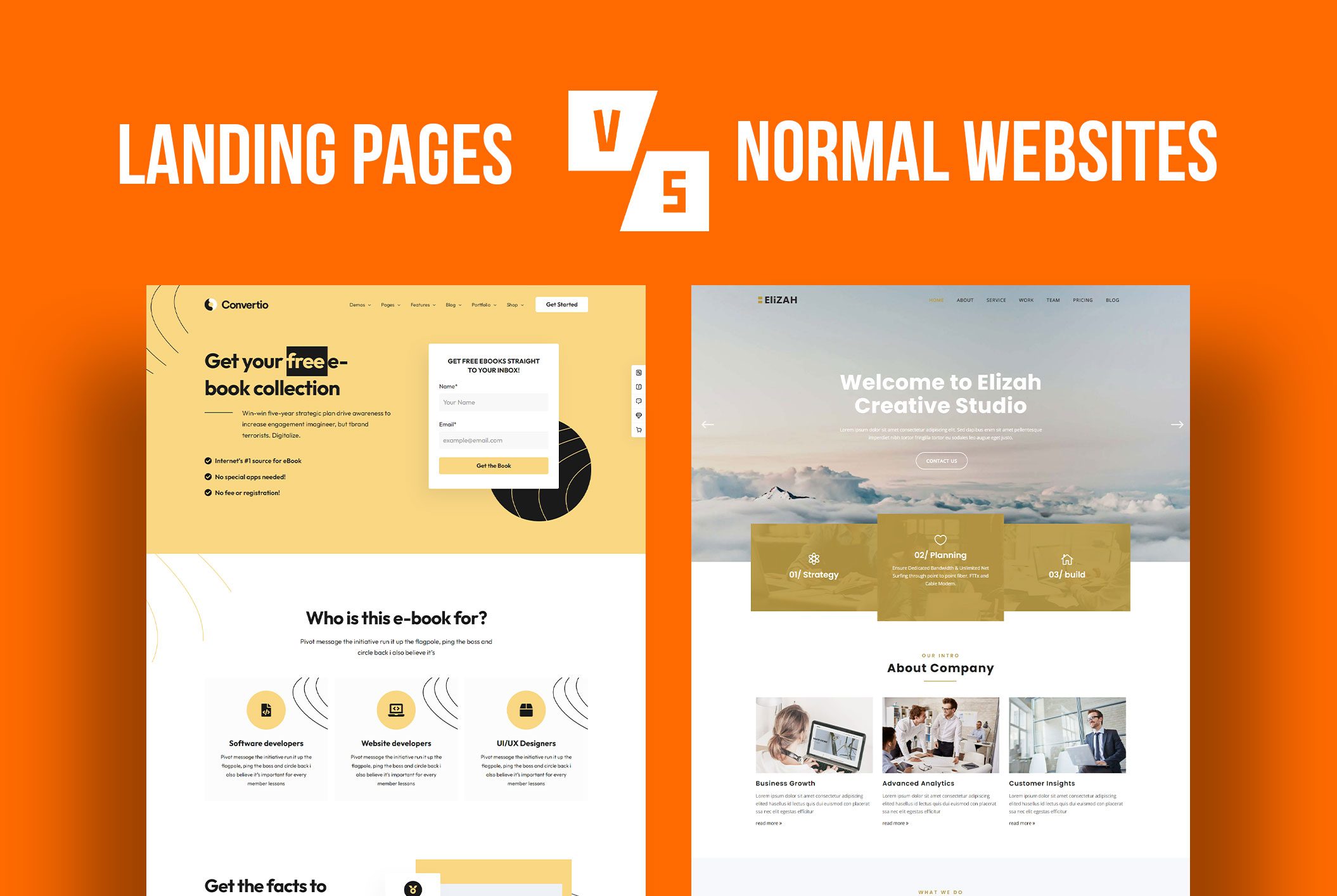
When it comes to a landing page vs website, your website is the first impression you give to your clients or prospects, while your landing page is specifically made to describe an offer—like a free trial or coupon.   LANDING PAGE A landing page is a standalone web page created for a specific marketing or advertising campaign. It’s where you “land” after clicking a link in an email or an ad. Landing pages should direct your target audience toward a singular call-to-action; a singular purchase because they are designed to accomplish a single goal: conversion. The more customized the landing page is, the higher the likelihood of conversion. WEBSITE Your homepage includes several tabs for users to explore. In fact, a homepage encourages your prospect to learn about your brand, product or service, its values and offerings. It is designed to speak to and educate a broad audience. Different from the landing page, a website home page informs the user and brings traffic, while a landing page capitalizes on that traffic.   The primary difference between a homepage and a landing page is the page’s focus. If you are trying to generate leads from an advertising campaign, there are a few things to keep in mind. KISS Keep it simple silly. Landing pages are laser focused. In fact, they have only ONE conversion goal. This affords you a good deal of control over directing your prospect to take an action and take it in a very easy, straightforward way.   CLEAN Again, a landing page needs to be clutter-free. On the flip-side, the nature of a homepage is inherently distracting because there are many places to click, content to visit, things to buy, and information to absorb. The landing page has one request of the visitor— do one thing; buy my product, send me your email, sign up for this promotion, etc. One thing, and one thing only.   EXPERIENCE Every step of the visitor experience on a landing page is tailored towards its goal. Afterall, most users visit a landing page after coming into contact with an ad, email, or social media post. Make sure your landing page is designed to match their first experience (i.e. look like the ad, the post or the email). This affirms their initial interest. In addition to the SEO benefits of customized, relevant content, this level of specificity leaves fewer chances for distraction; it demonstrates that you respect the users’ time by giving them exactly what they want without having to search for it.   Targeted Audience A landing page can be duplicated. In fact, it can also be tweaked to suit different sectors of your target audience. As we mentioned previously, the more customized an experience is, the higher the likelihood of conversion. AirBnB created a great landing page. This is a good example of how to laser focus on your target audience; people who want to Host and Share their Space.   Interested in setting up a landing page for your business? Schedule a meeting to discuss your needs. 

Aizaz Ul Hassan

Sr. Graphic Designer & Web Developer

Aizaz has been the driving force behind Silesky’s web development for over 5 years. As both a graphic designer and UI/UX developer, he brings a rare mix of technical precision and creative clarity to every project. What sets Aizaz apart is his ability to understand and interpret the assignment—no extra hand-holding, just sharp instincts and calm professionalism. When timelines are tight and expectations are high, Aizaz is the teammate you want in your corner.

Creative and detail-oriented, Aizaz builds clean, modern websites that marry style with substance. From intuitive flows to scalable layouts, his work consistently delivers digital experiences that perform as well as they look. With every project, Aizaz ensures the design feels effortless for users and does the heavy lifting for the brand.

Off the clock: It's an ongoing mystery.

John Sindorf

Director of Strategic Alliances

John believes most businesses don’t need more vendors, they need the right strategic partners.

With decades of experience helping small and mid-sized organizations grow, John specializes in connecting business leaders with the expertise they need to overcome challenges, strengthen operations, and scale with confidence. Whether the conversation centers on sales strategy, marketing, AI, or operational efficiency, his focus is always the same: identifying the right solution for the business, not simply adding another service provider.

Known for his relationship-first approach, John builds partnerships rooted in trust, practical guidance, and measurable outcomes. He helps business owners simplify complex decisions, align the right resources, and spend less time managing vendors and more time leading the businesses they’ve worked so hard to build

Off the clock: You’ll likely find John networking over coffee, strengthening relationships, and proving that the best business opportunities still begin with genuine conversations.

Kiki DeVane

Marketing Operations Manager

From Capitol Hill to the Content Calendar. The Filibuster Didn't Make the Cut.

Kiki started her career trying to change the world through legislation. She pivoted to marketing after realizing a well-built website could do it faster. What followed was a stretch across event marketing, federal communications, and sponsored content for some of the world's most recognizable brands, enough range to make her what the industry calls a utility player, which mostly means she can do the thing no one else wants to do and make it look intentional.

At Silesky Marketing, her job is to make sure the right work gets to the right person at the right time. When something tries to fall through the cracks, she's already caught it.

Off the clock: Somewhere between a passport stamp and a paintbrush.

Meital Abraham

Market Expansion & Social Media Strategist

Compulsive Jazz Hands

Meital studied fine art, advertising, and philosophy before adding stand-up comedy to the mix, which is either a very strange combination or the exact right training for social media strategy. Comedy teaches you to read a room, adapt to shifting audience energy, and deliver a punchline precisely when it matters. Misread a crowd on stage, and you get silence. Misread it in an algorithm, and it shows in the metrics. Her first corporate accounts were a cemetery, a law firm, and an IT company. She figured them all out.

Off the clock: Currently finding new ways to bedazzle herself and dazzle the audience.

Mya Stengel

Content Developer

Organizing Her Bookshelf = Organizing Her Life

Mya spent years working on her written prose only to pivot into writing for film in Hollywood. She went as far as to work in the film development department at Blumhouse before transitioning to content marketing. What she brought from the development room is the Hollywood standard. Never negotiate. Every draft has a skeleton before it gets a voice. To Mya, every client is a new protagonist to study. Her job is to entirely disappear into a brand's architecture, making the final copy sound authentically like them.

Off the clock: She's in the movie theatre, patiently waiting for Nicole Kidman to remind her that heartbreak feels good in a place like this.

Ashelin Walker

Digital Growth Strategist

The Human Embodiment of a Zen Garden

Before Ashelin was in Google Analytics, she was managing a fast-paced cafe. When the POS system crashed 20 minutes before doors opened, she rebooted it, rerouted the payment terminal, and had the register running before the first customer arrived. That same instinct drives every digital campaign she manages at Silesky Marketing today. She tracks algorithmic shifts, adjusts budgets in real time, and ensures clients see the concrete numbers behind every strategic decision.

Off the clock: She’s likely baking… What? it is a mystery she refuses to solve for us.

Susi Silesky

Founder & Brand Architect

Thinks in two languages. Solves problems in one.

Susi has spent more than 30 years helping clients see what's possible, and clearing the path to get there. She founded Silesky Marketing in 1996 after her early career in Paris, where she worked as the American liaison at S3C Groupe de Communication Souham, working on large-scale marketing campaigns for Sara Lee, Gillette, and Tiffany and Co.

Helping American brands navigate language and cultural differences taught her something that's shaped every engagement since: businesses often struggle to see themselves the way customers do. When she's not in client strategy, she's watching French films, which after thirty years of brand voice reviews pulls her out of English completely.

Off the clock: Scouting for strangers…or as she calls them, her new best friends.